Valorant Pro Settings 2026: Sensitivity, Controls & Competitive Setup
What Valorant pros actually use in 2026: verified sensitivity, eDPI, crosshair style, and resolution from named players, sourced from a public settings database and explained honestly.
What do actual Valorant pros run for sensitivity and crosshair right now? Pulled from ProSettings.net's individually tracked player pages, current eDPI among top competitive players ranges from as low as 160 to over 550, which alone should tell you there's no single number to copy. This roundup lists specific, sourced, named-player settings as of September 2026, explains what the wider dataset shows about trends, and is honest about the fact that every figure below can and will change as players adjust their setups or move teams.
Quick Answer: What Named Pros Actually Use
| Player | DPI x In-Game Sensitivity | eDPI | Crosshair style | Resolution |
|---|---|---|---|---|
| TenZ | 1600 x 0.195 | 312 | Cyan, thin cross with inner lines and outline, no center dot | 1920x1440 |
| ScreaM | 400 x 0.785 | 314 | Cyan, cross with center dot, inner lines, and outline | 1920x1080 |
| aspas | 800 x 0.4 | 320 | White, inner lines only, no outline, no center dot | 1920x1080 |
| Zekken | 1600 x 0.175 | 280 | Green, center dot with outline | 1920x1080 |
| Demon1 | 1600 x 0.1 | 160 | White, inner lines only, no center dot or outer lines | 1920x1080 |
| f0rsakeN | 800 x 0.712 | 570 | White, inner lines only, no center dot | 1920x1080 |
Every row is sourced from that player's individual ProSettings.net page, each dated between May and September 2026. The spread here, from Demon1's 160 eDPI up to f0rsakeN's 570, is the real point: two players competing at the same level, on the same game, use settings roughly three and a half times apart. Neither is wrong.
Where This Data Comes From
This isn't LootVora's own testing or a guess at what "feels right." Every figure above is pulled directly from ProSettings.net, a specialized third-party database that tracks individual pro-player configurations and updates them as players change setups. It is not an official Riot Games resource, and Riot does not publish or endorse any player's personal settings.
Worth flagging honestly: during research for this article, other settings-aggregator sites showed noticeably different numbers for some of the same players. Three separate sites listed three different sensitivity figures for TenZ alone. Rather than pick whichever number sounded most authoritative, this article draws exclusively from ProSettings.net's individually dated player pages, which is also the same source the rest of LootVora's Valorant settings coverage cites for pro-level context. If you check a player's settings elsewhere and see a different number, that's more likely a stale or unverified snapshot on the other site than an error here, but the honest answer is that any of these numbers can be outdated by the time you read this.
The Range Behind the Averages
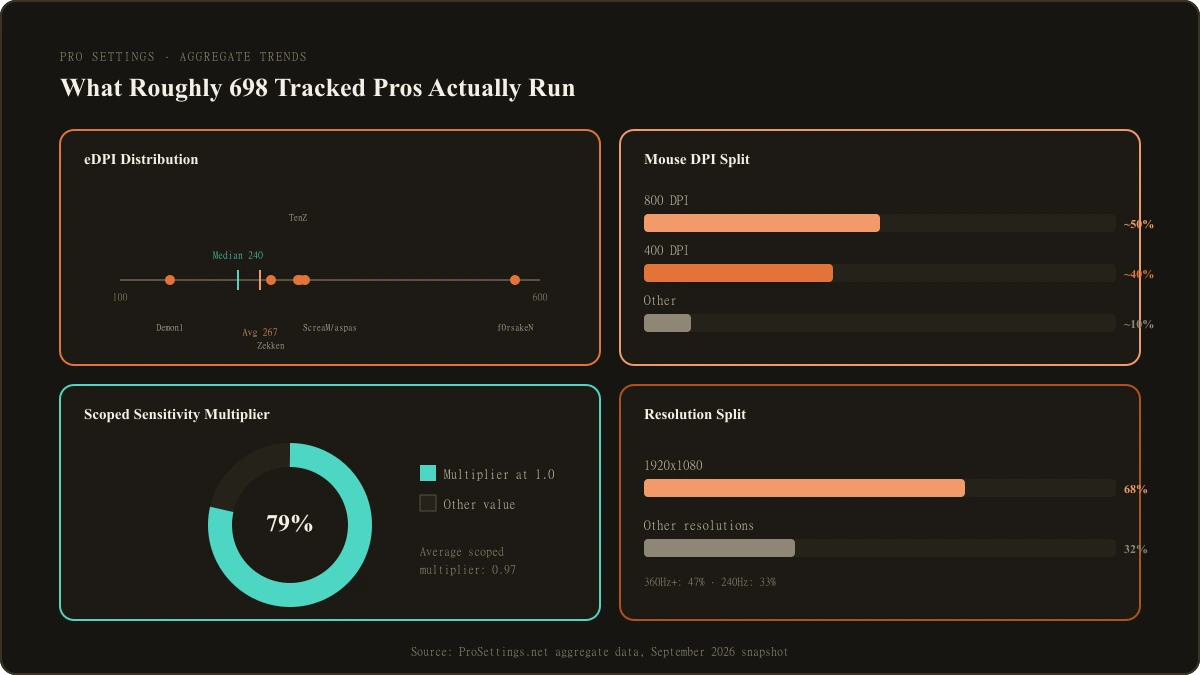
Beyond individual players, ProSettings.net's aggregate tracking of roughly 698 professional Valorant players gives a broader picture of where the competitive scene clusters, as of its own September 2026 update.
| Stat | Value | Source context |
|---|---|---|
| Average pro eDPI | 267 | Across all tracked pros |
| Median pro eDPI | 240 | Half of tracked pros sit above this, half below |
| Pros using 800 DPI | About 50 percent | Most common single DPI value |
| Pros using 400 DPI | About 40 percent | Second most common |
| Pros using scoped sensitivity of 1.0 | 79 percent | Matches hipfire and ADS multiplier by default |
| Average scoped sensitivity | 0.97 | Close to the 1.0 default, reflecting how few pros deviate |
| Pros on 1920x1080 resolution | 68 percent | Dominant resolution choice |
| Pros on 240Hz+ monitors | 47 percent at 360Hz or higher, 33 percent at 240Hz | No tracked pro uses below 144Hz |
The named players in the table above illustrate why an average of 267 doesn't mean much on its own. Demon1's 160 and f0rsakeN's 570 both sit well outside that average, yet both are competing at the top level. An average is useful for spotting a general center of gravity, not for telling you what you personally should run.
Crosshair Trends Among Pros
None of the six named players above uses Valorant's default green cross with movement and firing error enabled. That pattern holds broadly across the pro scene: high-contrast colors (cyan, green, white) dominate over red or the default green, outlines are common for keeping the crosshair visible against bright and dark backgrounds alike, and static crosshairs (no expansion while moving or firing) are far more common than dynamic ones. Beyond that, style varies a lot. Some pros run a visible center dot, others run bare inner lines with no dot at all, and outer lines are rarely used by any of the six players sourced here.
This article intentionally shows style notes rather than full crosshair codes or an explanation of what each customization option does. For exact codes and a full breakdown of every crosshair setting, see our dedicated crosshair guide.
Other Publicly Tracked Settings: Scoped Sensitivity, Polling Rate, and Gear
Beyond sensitivity and crosshair, ProSettings.net also tracks a handful of other values for these same six players, worth knowing mainly because they show how uniform some choices are compared to how personal others remain.
| Player | Scoped Sensitivity | Polling Rate | Mouse | Monitor Refresh Rate |
|---|---|---|---|---|
| TenZ | 1.0 | 1000 Hz | Pulsar TenZ Signature Edition | 540 Hz |
| ScreaM | 1.0 | 4000 Hz | Finalmouse Ultralight X Frostlord Classic | 600 Hz |
| aspas | 1.0 | 1000 Hz | Logitech G Pro X Superlight 2 | 540 Hz |
| Zekken | 0.8 | 1000 Hz | Razer Viper V4 Pro | 600 Hz |
| Demon1 | 1.0 | 4000 Hz | ASUS ROG Harpe Ace 2 | 600 Hz |
| f0rsakeN | 1.0 | 4000 Hz | Pulsar Susanto-X | 400 Hz |
Five of the six players here run Scoped Sensitivity at exactly 1.0, matching hipfire on the Operator, Outlaw, and Marshal. Zekken is the exception at 0.8, a deliberate reduction that suggests he prioritizes controlled scoped flicks over matching his hipfire speed. That split mirrors the wider 79 percent figure from the aggregate stats above almost exactly. Polling rate and monitor refresh rate show far less consensus: three of the six run 4000 Hz polling while the other three run the more traditional 1000 Hz, and refresh rates range from 400 Hz up to 600 Hz across the group. None of this gear is a requirement to compete at a high level. It mostly reflects equipment access most readers won't have through sponsorships, and it isn't a recommendation the way the sensitivity and crosshair choices above are.
Should You Copy a Pro's Sensitivity?
Copying a specific pro's eDPI is one of the most common mistakes players make when trying to improve. A pro's number reflects their exact mousepad size, monitor, grip style, and years of repetition with that specific feel, none of which transfers over just because you typed in the same value. f0rsakeN's 570 eDPI works because it's paired with his particular setup and playstyle, not because it's objectively better than Demon1's 160.
If you're trying to find your own number rather than borrow one, the process is the same regardless of what any pro runs: pick a fixed DPI, start somewhere in a broad usable range, test with actual flicks rather than guessing, and give a setting real time before changing it again. Our full sensitivity and DPI guide covers that formula and step-by-step process in depth, including the eDPI and cm/360 math this roundup deliberately doesn't repeat.
How Often These Settings Change
Every number in this article is a snapshot. Pro players adjust sensitivity and crosshairs between events, switch mice and monitors when sponsorships change, and occasionally overhaul their entire setup after a bad tournament. Rosters shift between splits too, which can put a player on new hardware entirely. Treat this roundup as accurate at the time it was researched, not as a permanent reference, and check a player's individual ProSettings.net page directly if you need their current setup rather than relying on any single article, including this one.
Frequently Asked Questions
What sensitivity does the average Valorant pro use? Average pro eDPI sits around 267, with a median closer to 240, per ProSettings.net's tracking of roughly 698 professional players as of September 2026. Individual pros vary well outside that range in both directions.
Do most pros use 800 DPI? Roughly half of tracked pros use 800 DPI, and about 40 percent use 400 DPI, with almost no pro using a DPI above 1600.
What crosshair color do most pros use? There's no single dominant color, but high-contrast options like cyan, green, and white are far more common than red or Valorant's default green, mainly for visibility against varied map backgrounds.
Should I use a pro's exact settings? Not directly. Their numbers reflect their specific mousepad, monitor, grip, and years of practice. Use them as reference points for the general range competitive players land in, then find your own number using a structured process rather than copying a figure outright.
What to Read Next
This roundup covers named pro configurations specifically. From here:
- For the full settings walkthrough beyond sensitivity, read our complete best settings breakdown.
- For the eDPI and cm/360 formulas plus a step-by-step method to find your own sensitivity, read our full sensitivity and DPI guide.
- For full crosshair codes and a complete option-by-option breakdown, read our dedicated crosshair guide.
- If you're curious what driver-level and Reflex settings pros use for performance rather than aim, read our FPS and performance guide.

Jordan Blake is the Game Settings Editor at LootVora, covering in-game settings, sensitivity, graphics, controls, keybinds, and performance.